
If you have been searching for the Twitch Desktop App, you have probably noticed that it has almost disappeared from the internet. The official download page no longer exists, many download links return errors, and even the Wayback Machine cannot provide the original installer because Twitch removed its download servers years ago.
Despite that, many people are still looking for the desktop application. Some prefer using a dedicated app instead of opening Twitch in a browser. Others want to preserve discontinued software before it disappears forever. Some users miss the classic Twitch experience.
I recently tested an original copy of the Twitch Desktop App to find out how much of it still works today. Instead of repeating old information from outdated websites, this article is based on actual testing performed on a modern Windows PC.
The results were far more interesting than expected.
Why Was the Twitch Desktop App Discontinued?
The Twitch Desktop App was introduced to bring Twitch beyond the web browser. It combined live streaming, chat, friends, whispers, notifications, and several community features into a single desktop application.
At one point, it also included Curse integration, allowing gamers to manage mods for supported games directly inside the application.
Over time, Twitch shifted its focus back to the web platform. Most users watched streams through their browser while creators preferred software such as OBS Studio for broadcasting. Twitch eventually discontinued the desktop application and removed the official download page.
Today, finding the installer has become surprisingly difficult.
Why Is the Installer So Hard to Find?
Many discontinued applications remain available somewhere on the internet. The Twitch Desktop App is different.
There are several reasons why.
First, Twitch removed its official download servers. Older download links pointed directly to Twitch’s CDN, which no longer hosts the installer.
Second, the Wayback Machine mainly archives web pages instead of executable files. Even if the download page is archived, clicking the installer usually leads to a dead link because the original server no longer exists.
Finally, very few people preserved the installer before it disappeared. Unlike popular software such as Steam or Discord, there was no large preservation effort for the Twitch Desktop App.
Because of this, thousands of users continue searching for a working installer years after the application was discontinued.
Testing the Original Twitch Desktop App
Instead of relying on old blog posts, I decided to test an original installer.
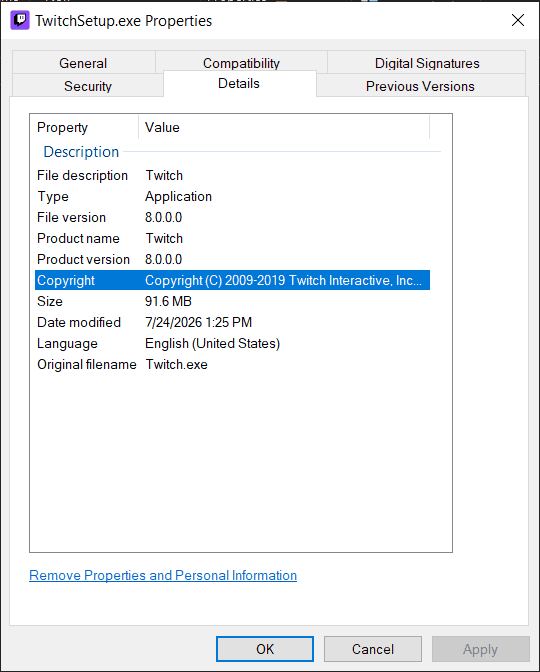
The installer is digitally signed by Twitch Interactive, Inc., which is an important indicator that it is an authentic release rather than a modified copy.
Here are the installer details.
Application Information
- Product Name: Twitch
- File Version: 8.0.0.0
- Product Version: 8.0.0.0
- Original Filename: Twitch.exe
- File Size: Approximately 91.6 MB
- Copyright: Twitch Interactive, Inc.
The installer also contains official digital signatures from Twitch Interactive.
Authenticity is important because many unofficial software archives repackage discontinued programs, making it difficult to know whether the file has been modified.
Installation Experience
One concern before testing was whether the installer would even complete successfully.
Many discontinued applications depend on online services that no longer exist. Sometimes the installer downloads additional files from servers that have already been shut down.
Fortunately, the Twitch installer completed without any installation problems.
After installation finished, the application launched normally.
There were no crashes during startup, and Windows recognized it as an officially signed application.
Can You Still Log In?
This was one of the biggest questions.
A desktop application is not very useful if the login system no longer works.
Fortunately, the answer was positive.
I successfully logged into my Twitch account without encountering login errors.
The application accepted my account credentials and synchronized my account information normally.
After signing in, my profile loaded correctly along with my subscriptions and account settings.
This was an encouraging sign because many people assume the desktop application is completely unusable today.
Watching Live Streams
The next step was testing the feature that most people actually care about.
Can the Twitch Desktop App still play live streams?
Yes.
Live streams loaded successfully during testing.
Playback worked normally without requiring any special configuration.
Video quality could be adjusted just like the web version, and streams played without obvious compatibility problems.
For many users, this alone is enough reason to keep using the desktop application instead of opening Twitch inside a web browser.
Chat Functionality
Watching streams is only part of the Twitch experience.
Live chat is what makes Twitch unique.
Fortunately, chat remains functional in the tested version.
Messages appeared normally while watching streams.
Sending messages also worked during testing after logging into the account.
This means users can still participate in conversations instead of simply watching streams as passive viewers.
For anyone searching specifically for a desktop chat client, this is excellent news.
Creator Features
The application also provides access to creator-related features.
Inside the account menu, options such as Creator Dashboard and Stream Summary are still available.
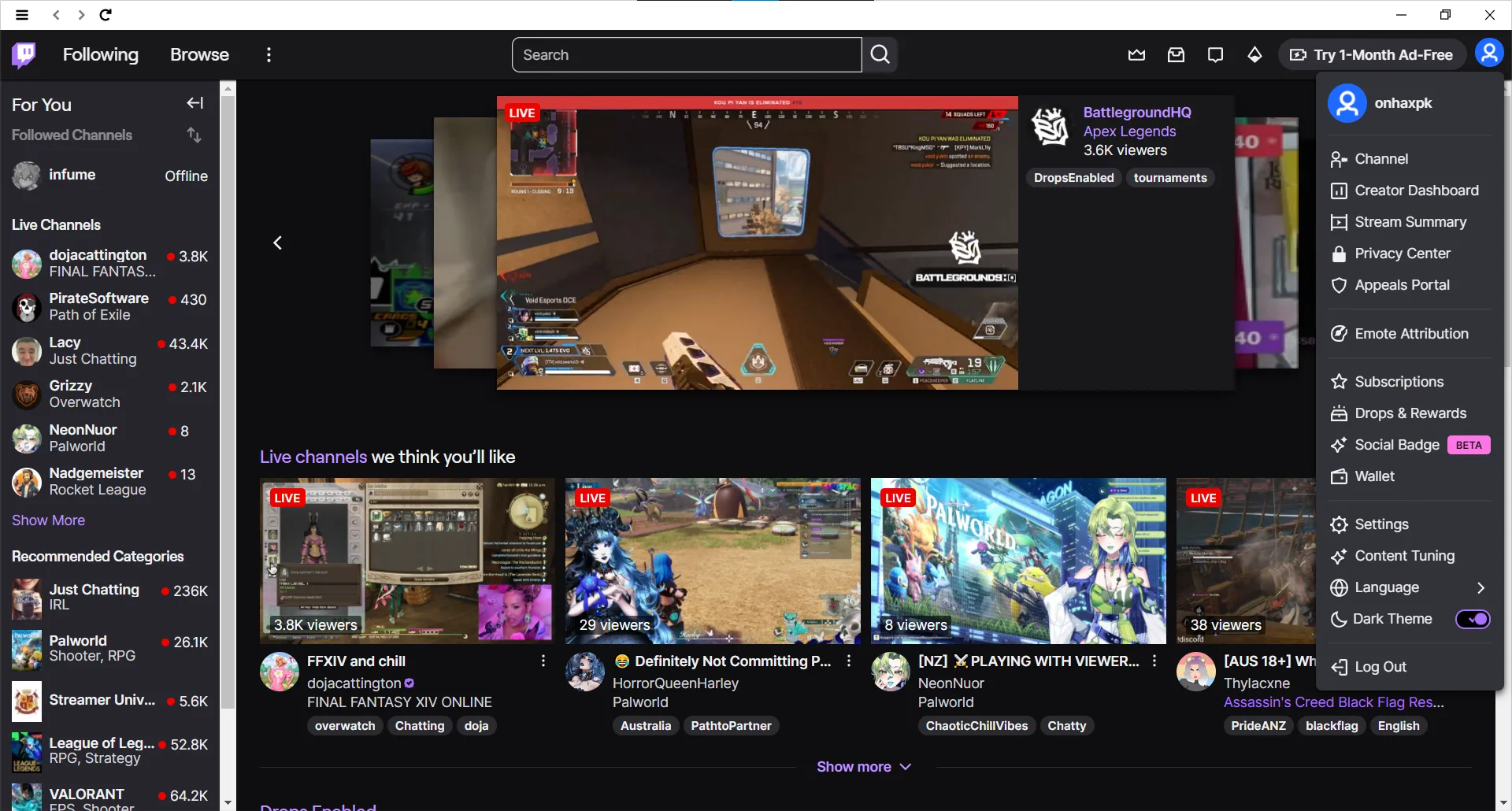
Selecting Creator Dashboard opens the official Twitch website inside the default web browser rather than inside the desktop application itself.
This behavior is expected because Twitch has gradually moved creator tools to its web platform.
Although the desktop application no longer handles creator management internally, it still provides quick access to these features.
What About Broadcasting?
One question many people ask is whether the Twitch Desktop App can still be used for streaming games.
During testing, no built-in broadcast option was available inside the application.
There was no visible Go Live button or streaming interface.
This suggests that Twitch removed integrated broadcasting from this version before discontinuing the application.
If you want to stream on Twitch today, you will still need dedicated streaming software such as OBS Studio.
Fortunately, this does not affect watching streams or participating in chat.
Features That Still Work
After spending time testing the application, here are the features confirmed to be working.
- Login
- Watching live streams
- Live chat
- Browsing channels
- Profile management
- Creator Dashboard shortcut
- Stream Summary
- Subscriptions
- Drops and Rewards
These are the core features most Twitch viewers use every day.
For anyone searching for a lightweight Twitch client, this is surprisingly good news.
Features That Are No Longer Available
Although the Twitch Desktop App continues to perform surprisingly well, not every feature from its early days has survived.
During testing, I could not find the following features that older users may remember:
- Voice Chat
- Friends system
- Servers and communities
- Built-in broadcasting tools
These features were introduced when Twitch wanted to compete with applications such as Discord. Over time, Twitch removed many of them and shifted its focus back to the web platform.
This does not reduce the usefulness of the application for watching streams and chatting, but it is something users should know before downloading it.
Performance on Modern Windows
One concern before installing older software is compatibility with current versions of Windows.
Fortunately, the Twitch Desktop App performed well during testing.
The application launched without compatibility errors and responded quickly while navigating between channels and categories.
Video playback remained smooth during live streams, and chat updated in real time without noticeable delays.
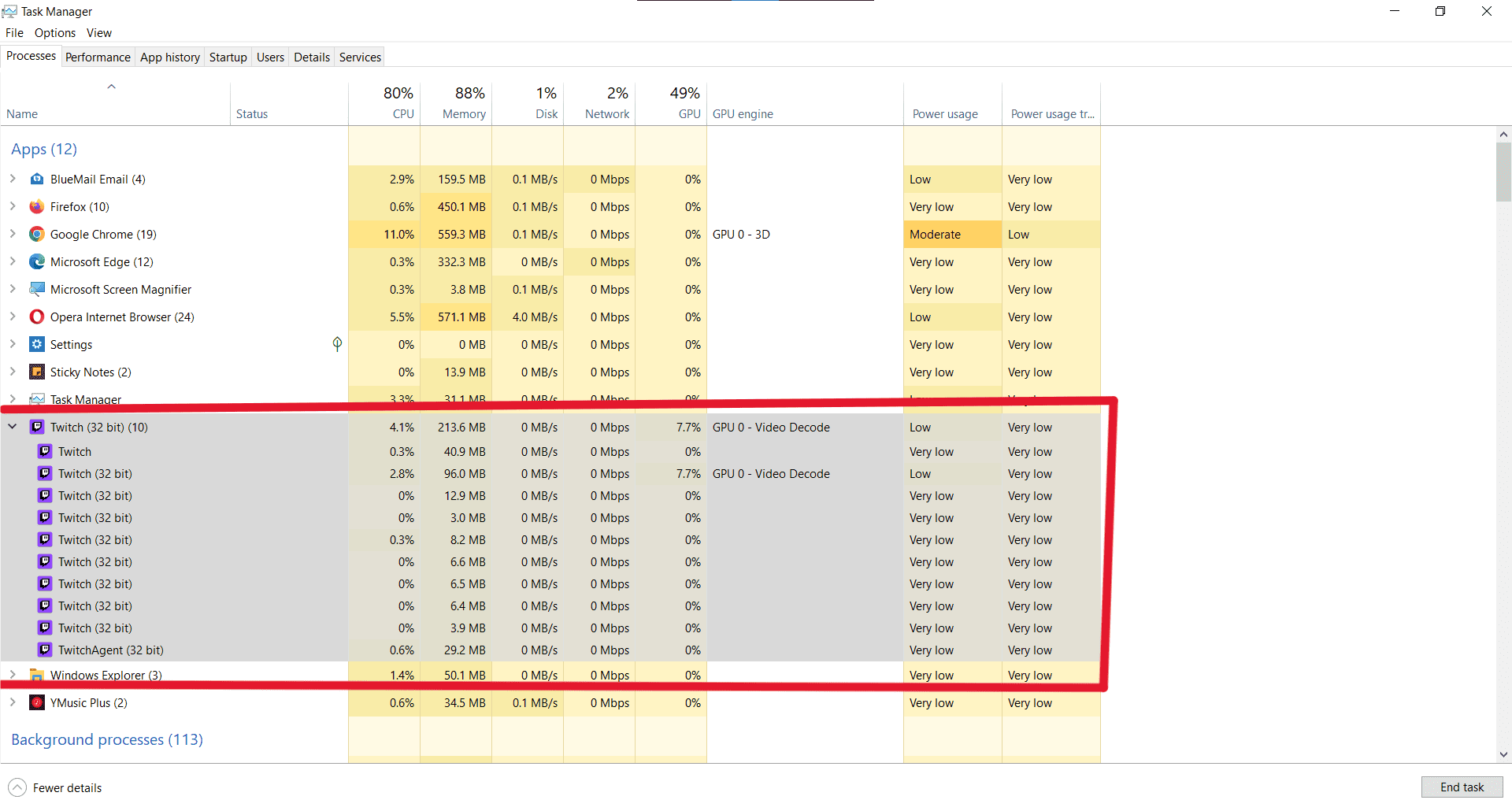
Task Manager identifies the application as Twitch (32-bit). While some people may assume this is a disadvantage, it is perfectly normal for applications developed during that period. The app still runs correctly on modern 64-bit versions of Windows.
For users who want a dedicated Twitch application instead of opening another browser tab, the experience remains enjoyable.
Is the Twitch Desktop App Better Than the Browser?
The answer depends on how you use Twitch.
If your goal is watching streams, chatting with other viewers, and following your favorite creators, the desktop application still provides a clean, distraction-free experience.
Many users prefer having Twitch in its own application instead of keeping multiple browser tabs open throughout the day.
The desktop app also feels more organized because everything related to Twitch stays in one place.
On the other hand, creators who regularly manage their channels will probably spend more time on Twitch’s website because the Creator Dashboard now opens in the browser.
Likewise, anyone planning to stream games should use dedicated broadcasting software such as OBS Studio.
Should You Still Download the Twitch Desktop App?
After testing the application, my answer is yes, but with realistic expectations.
If you expect every feature from years ago to still exist, you may be disappointed.
However, if your goal is to watch live streams, participate in chat, browse Twitch, and enjoy a desktop experience, the application still performs much better than many people expect.
Considering that Twitch officially discontinued the desktop app years ago, it is impressive that the core functionality still works.
For software preservation enthusiasts, this application is also an interesting piece of Twitch history.
Is the Installer Authentic?
Finding a Twitch installer today is difficult.
Many websites either host modified installers or provide download links that no longer work.
The installer tested for this article appears to be authentic based on several observations.
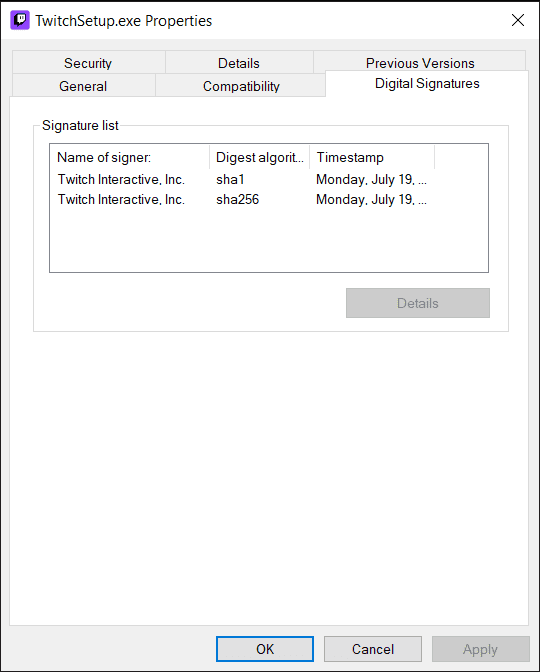
Twitch Interactive, Inc, digitally signs it.
The installer reports Version 8.0.0.0.
The original filename is Twitch.exe.
The application installs successfully without Windows security warnings related to unknown publishers.
Most importantly, the application functions normally after installation.
Although digital signatures are a strong indicator of authenticity, I still recommend verifying the SHA 256 hash after downloading any archived software. This allows users to confirm that the file has not been modified.
How to Download Twitch Desktop APP
I am uploading it on 2 different hosting platforms. One is mediafire and other one is datavaults. if you download from the datavaults then i can earn some money. its up to you now which one you choose. Downloading from datavaults can be risky so must watch the video how to download.
Download it from Mediafire
Download it From DataVaults
How to Download from Datavaults
Extract Zip file using Winrar. Password is: onhaxpk.net
Frequently Asked Questions
Is the Twitch Desktop App still available from Twitch?
No.
Twitch removed the official download page and no longer provides the installer through its website.
Does the Twitch Desktop App still work?
Based on my testing, yes.
Login works.
Live streams play correctly.
Chat is functional.
Creator Dashboard opens in your web browser.
Can I stream games using the Twitch Desktop App?
No built-in broadcasting option was available during testing.
If you want to stream, you should use OBS Studio or another compatible streaming application.
Does Voice Chat still work?
No.
Voice Chat was not available in the tested version.
Is this the official Twitch application?
The installer tested in this article is digitally signed by Twitch Interactive, Inc., indicating it is an official release.
Does it work on Windows 11?
Yes.
The application installed and ran successfully on a modern Windows system during testing.
Final Thoughts
Finding the Twitch Desktop App in 2026 is much more difficult than it should be.
Most official download links have disappeared, archived download pages often lead to broken installer links, and many people assume the application no longer works at all.
After testing an original installer, I found that reality is very different.
The application still installs successfully.
Logging into a Twitch account still works.
Watching live streams remains fully functional.
Chat continues to operate normally.
Creator-related shortcuts are still available, although they now redirect to Twitch’s website.
Some classic features such as Voice Chat and built-in broadcasting are no longer present, but the core viewing experience remains intact.
If you have been searching for the Twitch Desktop App because you enjoy using a dedicated desktop client instead of the browser, this archived version is still worth trying.
As with any discontinued software, remember that Twitch no longer officially supports the application. Future changes to Twitch’s services could affect compatibility at any time.
For now, however, the Twitch Desktop App continues to provide a surprisingly capable way to enjoy Twitch on Windows.


Sorry, but I tried to leave a comment on the CSP webpage, but no response so I wanted to know why the second link, the one made by you, isn’t working at all
Hi, can you tell me which Clip Studio Paint app link is not working. For me CSP 5.0 all links are working perfectly. if you are looking for any other version let me know. thanks