Face swap technology has moved past the era of glitchy meme generators. After two weeks of testing over a dozen platforms on real footage, dynamic head turns, difficult lighting, and group shots. I can say with confidence that the gap between “toy” and “tool” has never been wider.
The short version? If you want the best balance of quality, free tier utility, and workflow integration, start with Magic Hour. If you are a developer building a product, you need API reliability. If you are a casual creator looking for a quick laugh, Reface is still king.
Best tools of 2026
The “killer app” for 2026 is the Workflow. No one wants to export a face swap, import it into a lip-sync tool, then import that into a video editor. Platforms that offer face swap combined with lip sync and image to video in one place are the future. Here are some best AI face swap tool with their pros and cons:
| Tool | Best For | Video Support | Free Tier | Platform | Starting Price | Max Resolution |
| Magic Hour | Best Overall / Real Footage | ✅ Yes | ✅ 400 credits (never expire) | Web | $10/month | 4K |
| DeepSwap | Production Quality | ✅ Yes | ❌ (Trial only) | Web | Pay-per-use ($9.99+) | 4K |
| FaceFusion | Open Source / Privacy | ✅ Yes | ✅ Unlimited (local) | Desktop (Local) | Free | 8K (local) |
| Reface | Mobile / Viral Clips | ✅ Yes | ✅ 5 swaps/day | Mobile / Web | $3.99/month | 720p |
| Akool | Enterprise API | ✅ Yes | ✅ Limited | Web / API | Custom | 1080p |
| Remaker AI | Multi-Face Video | ✅ Yes | ✅ Daily credits | Web | Pay-per-use | 1080p |
| Vidnoz | Free Daily Quota | ✅ Yes | ✅ 10 mins/day | Web | $9.99/month | 720p |
| Fotor | Photo Retouching | ❌ No | ❌ (Watermarked only) | Web / Desktop | $5.99/month | 4K |
| Pixlr | Browser Photo Editor | ❌ No | ✅ Limited (ads) | Web | $4.90/month | 1080p |
| CapCut | TikTok Integration | ✅ Yes | ✅ Unlimited | Mobile / Desktop | Free | 1080p |
- Magic Hour
After testing dozens of options, Magic Hour is the most impressive platform for creators who need professional results without a steep learning curve. Unlike tools that only work on pristine, forward-facing selfies, Magic Hour’s face swap ai handles real-world footage with heavy motion and variable lighting exceptionally well.
Pros:
- No signup required to try. You get free credits instantly without attaching a credit card.
- API parity. If you need to scale, the API offers the same quality as the web app .
Cons:
- Can struggle with extreme profile shots (beyond 70 degrees).
- The credit system requires a mental shift from “subscription” to “utility” billing.
- DeepSwap
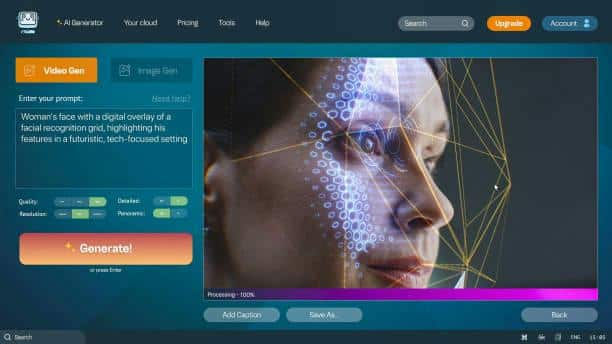
If you need to output to a big screen or run a commercial campaign, DeepSwap is the runner-up. It uses a “multi-engine” approach, running several AI models simultaneously and letting you pick the best result.
Pros:
- Excellent handling of harsh directional lighting.
- Supports batch processing for photos.
Cons:
- No permanent free tier (only trial credits).
- The interface feels cluttered with 150+ other AI tools you likely don’t need .
3. FaceFusion
For the privacy-conscious or developers who want to tinker, FaceFusion is the technical winner. It runs locally on your machine (no cloud uploads) and uses 200+ facial landmark detection points.
Pros:
- Zero cost. Completely free and open source.
- High accuracy. 95.8% claimed face similarity .
Cons:
- Requires a decent NVIDIA GPU and Python knowledge to install.
- No “one-click” workflow; requires manual tuning.
4. Reface
Reface is the fastest mobile app on the market. It prioritizes speed and humor over photorealism.
Pros:
- Swaps faces in 3-5 seconds.
- Massive library of trending GIFs and meme templates.
Cons:
- Lower resolution output.
- Watermark on the free tier.
5. Akool
Akool is the enterprise choice. While their web demo is fine, the real power lies in their API, which handles massive scale and compliance.
Pros:
- GDPR and CCPA compliant templates.
- Supports face swap for e-commerce product videos.
Cons:
- Expensive for individual creators.
- The web interface feels secondary to the API.
6. Remaker AI
Most tools break when you try to swap two faces in the same video. Remaker handles this elegantly, allowing you to select and configure each face individually before rendering .
Pros:
- Superior tracking for groups (2+ faces).
- Intuitive face selection UI.
- Fast render speeds.
Cons:
- Individual face quality is lower than Magic Hour.
- Daily credit limits on free plans are restrictive.
7. Vidnoz
Vidnoz is a web-based alternative that offers a substantial amount of free daily usage, though you will wait in queues.
Pros:
- No watermark on exports.
- Large template library.
Cons:
- Long rendering times during peak hours (7-9 minutes average).
- Quality degrades on side profiles.
8. Fotor
Fotor integrates face swap directly into a professional photo editor. It is excellent for fixing wedding photos or group shots where someone blinked.
Pros:
- Skin tone matching and blemish correction post-swap.
- Batch processing for multiple photos.
Cons:
- No video support.
- Requires Pro plan for high-resolution export .
9. Pixlr
Similar to Fotor, Pixlr offers a free, browser-based AI face swap. It is quick and dirty for still images.

Pros:
- Drag-and-drop simplicity.
- No installation.
Cons:
- Heavily ad-supported on free tier.
- Manual layer editing required for complex swaps.
10. CapCut
CapCut is owned by ByteDance, the same company that owns TikTok, which makes the integration between the two platforms seamless. You can swap a face and drop it into a trending audio track in seconds.

Pros:
- Totally free (no watermark if you export correctly).
- The AI effects pipeline is fast.
Cons:
- It applies face swap as a “filter” rather than a deep render, so it can look plastic.
- Less precise than dedicated tools.
How We Chose These Tools (Methodology)
I tested each tool using three specific video clips:
The Talking Head: A forward-facing speaker (easy).
The Turn Test: A subject turning their head 45-90 degrees (medium/hard).
The Group Shot: Two people talking to each other (hard).
Evaluation criteria:
- Temporal Consistency:
- Edge Blending:
- Speed:
- Cost per minute:
The Market Landscape & Trends
We are seeing a distinct split in the market. On one side, you have local rendering (FaceFusion, DeepFaceLab) which offers maximum quality for those with expensive GPUs. On the other hand, cloud-based workflows (Magic Hour, Akool) are winning because they offer convenience and additional tools like lip sync and ai image editor with prompt free functionalities.
Conclusion
For daily content creation, localization, and professional marketing videos: Go with Magic Hour. The $10/month Creator plan is unbeatable for the feature set (Face swap + Lip sync + Video generation). For a quick, funny meme on your phone: Use Reface. For a high-budget film project where you control the hardware: Use FaceFusion or DeepFaceLab. These are the best AI face swap tools in 2026. Use these tools in your daily life.
FAQs
Can I use face swap for deepfake adult content?
A: No. Every reputable platform listed here (especially Magic Hour and DeepSwap) strictly bans non-consensual intimate content (NCII). Violations result in permanent bans.
Q: Which tool has the best free plan?
A: Magic Hour offers the best free plan because the 400 free credits never expire and the exports have no watermark. Most competitors (like Reface) force a watermark or limit you to 5 seconds .
Q: Which tool handles side profiles best?
A: Magic Hour and DeepSwap lead on profile accuracy. FaceFusion (local) is best if you have time to tune settings. Reface and CapCut fall apart on side profiles.
Q: Do any of these tools offer an API for developers?
A: Yes. Magic Hour (full API parity), Akool (enterprise API), and DeepSwap (limited API) all offer programmatic access. Magic Hour’s API is the most accessible for small teams.